


If you get carsick when looking at your phone, experts say to try this app on your smartphone to avoid feeling dizzy
A simple feature on many phones syncs what you see with how your body moves, which can ease nausea during car rides.
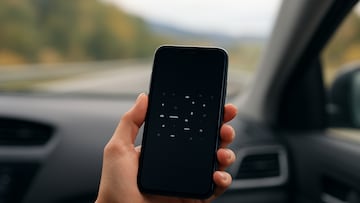

Carsickness comes in different shapes and forms, from those who feel nauseous the second their vehicle sets off to others who only get dizzy if they look at their phone while on the move.
If you fall into that latter category, you are certainly not alone. The simplest solution is, of course, to keep your phone in your pocket, bag or wherever you usually carry it. Your eyes and your brain will appreciate the downtime away from the screen.
If you really cannot help yourself though, there is another way to combat motion sickness without putting your phone away. Especially if it is an iPhone.
A new iPhone feature that fights nausea
The latest major version of Apple’s mobile operating system, iOS 18, was released to the public in 2024 and includes an accessibility feature called Vehicle Motion Cues, which could become your new best friend in the car.
To activate Vehicle Motion Cues, open Settings, then Accessibility, tap Motion, then Show Vehicle Motion Cues, and select either On or Automatic.
Once activated, you will see small animated dots around the edges of your screen. They move in sync with the motion of your car.
How Vehicle Motion Cues works
Speaking to Reader’s Digest, Dr. Rron Bejtullahu explains the purpose they serve.
“Motion sickness happens when your brain gets mixed signals from your eyes and inner ears. With a phone, your brain gets mixed messages from your ears and eyes and thinks something is wrong, so it makes you feel sick as a defense mechanism. Your inner ear tracks every turn and stop, and when your eyes see just a flat screen, your body does not know which sense to trust.”
“The iPhone Vehicle Motion Cues feature helps by stabilizing what you see on your screen so your eyes and inner ears match better,” Dr. Bejtullahu adds. “The dots slide forward when the car speeds up, backward when it brakes and sideways during turns, so your eyes and ears finally agree on what is happening.”
According to Dr. Bejtullahu, his patients who have used Vehicle Motion Cues have reported a 30 to 50 percent drop in nausea.
What about Android?
At present, there is no equivalent feature on Android, but Google is believed to be developing the similarly named Motion Cues, which may be added as a feature before long.
Third party apps such as Vehicle Motion Cues, unrelated to the iOS feature, KineStop and MotionEase can be downloaded for a similar purpose, although Dr. Bejtullahu believes they are not as effective as Apple’s Vehicle Motion Cues.
Related stories
Get your game on! Whether you’re into NFL touchdowns, NBA buzzer-beaters, world-class soccer goals, or MLB home runs, our app has it all.
Dive into live coverage, expert insights, breaking news, exclusive videos, and more – plus, stay updated on the latest in current affairs and entertainment. Download now for all-access coverage, right at your fingertips – anytime, anywhere.
Complete your personal details to comment