

How to improve the performance and storage of your ASUS ROG XBOX Ally X
We explain the process for installing a larger, faster SSD in your ASUS portable console in a cost-effective way.

The market for high-performance handheld consoles, such as the Steam Deck and ASUS ROG Ally X, has changed the game for those looking to take their PC titles anywhere. However, these powerful machines often face a common obstacle: limited storage. With 1 TB factory-installed, space quickly runs out after installing next-generation (AAA) games.
Fortunately, there is an alternative that not only gives you more space, but also allows your games to load much faster without spending a fortune on special storage units.
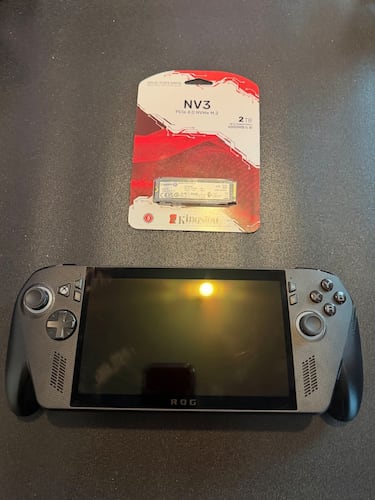
Why replace the original SSD in the ASUS ROG XBOX Ally X?
The ASUS console originally includes an SSD drive with sequential read speeds of up to 4,900 MB/s and write speeds of 4,500 MB/s.
By switching to a Kingston NV3 SSD, we can increase the read speed to 6,000 MB/s, which represents a leap forward that will improve our experience compared to what comes standard.
What materials are needed for this process?
Unlike the mod we did with the Rog Ally, which required a specialized adapter, here we only need:
- A PCIe 4.0 NVMe M.2 SSD drive (2280 format).
- A precision screwdriver
- and a lot of patience.
What is the installation process like, and what benefits does it offer?
The procedure begins by removing the seven screws from the back of the console, taking great care not to damage a connection it has with the triggers. Unlike the Rog Ally, here we don’t need to disconnect the battery to remove the factory-installed SSD. Once this is done, replace the drive with the new SSD, making sure everything is secure before closing.
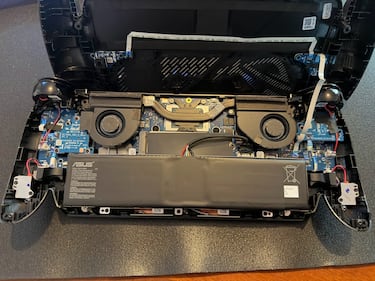
After the physical change, the console will automatically enter the BIOS, where you can use the ASUS Cloud Recovery function. This tool automatically downloads and reinstalls the operating system and necessary drivers via Wi-Fi.

The benefits we will enjoy are:
- Faster read speeds.
- Faster loading times: Waiting times when opening games or changing levels will be reduced.
Related stories


This modification transforms the ASUS ROG XBOX Ally X into a true portable gaming beast, eliminating the frustration of having to constantly delete games to free up space.
Follow MeriStation USA on X (formerly known as Twitter). Your video game and entertainment website for all the news, updates, and breaking news from the world of video games, movies, series, manga, and anime. Previews, reviews, interviews, trailers, gameplay, podcasts and more! Follow us now!
Complete your personal details to comment