


How to optimize your recommendations on Spotify: 10 tricks that really work
With every click or listen on Spotify, we can train the algorithm to recommend only the best content based on our preferences.


Getting the right music recommendations on Spotify is easier than it seems, but we must be doing something wrong if we’re not satisfied with ours. Many users believe that listening to their favorite artists is enough, but there are a few small details we can use to help the app better tune into our tastes.
Ten tips to help Spotify really get right what we want to listen to
Spotify’s algorithm is more complex than many people think, and it behaves based on parameters such as retention and positive or negative signals that we send, many of which we are not even aware of. Here are the ten most useful tips to follow so that we can continually discover new music that best suits our preferences.
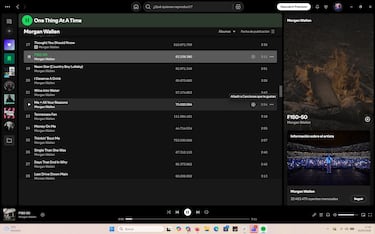
- Only “like” what you really like: This feature should not be used lightly, but only for songs that we truly love. If we do it indiscriminately, the algorithm will become “confused,” so to speak. To do this, simply click on the + icon next to the song or on the three dots and then click on “Save to songs you like” (as shown in the image above).
- Don’t hesitate to block: Just like on social media, you can block content you don’t like, both artists and songs. This process is much simpler, as Spotify already interprets fast skipping (less than 30 seconds) as a dislike.
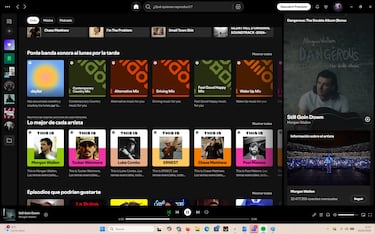
- Be careful with “for you” lists, not all of them are what they seem: The Weekly Discovery list is the best, while it is advisable to avoid Daily Mix.
- Don’t listen to unusual music from your main account: If you have children, you may occasionally play children’s music for them, or at times you may want to enjoy your “guilty pleasure.” Avoid doing so from your main account so as not to distort the algorithm. Activating the “Private Session” feature is useful in this case.
- Use the Create Blend feature: Spotify Merges mix tastes between accounts. This way, if you mix with people who have similar tastes to yours, Spotify refines your profile... but the opposite also happens. Be careful.
- Clear your playback history if you haven’t followed step 4: It’s very simple, just go to “My Library” and click ‘Delete’ in the “Recently Played” section.
- Create playlists that are as specific as possible: If we create a playlist with too many different music styles or artists, Spotify won’t recognize which ones are truly our favorites.
- Set the timer when you go to sleep with music: If Spotify detects that you listen to white noise or ambient music, it will assume that you like it... and recommend it to you next time.
- Listen to the songs you like in full: This is somewhat of an extension of points 1 and 2. If you don’t skip a song you like, Spotify will interpret that you like it, although not as emphatically as if you add it to your “Songs I like” list.
- Listen to the New Releases Radar every week: This list is updated every Friday and is based exclusively on songs, styles, and artists you like.
Related stories
If you follow these ten tips, Spotify will start recommending music that really suits you. All you need is a few minutes and some good habits to train the algorithm, and you’ll notice the difference in just a few days.
Follow MeriStation USA on X (formerly known as Twitter). Your video game and entertainment website for all the news, updates, and breaking news from the world of video games, movies, series, manga, and anime. Previews, reviews, interviews, trailers, gameplay, podcasts and more! Follow us now!
Complete your personal details to comment