

Want to know how much you spent on Steam? This secret platform menu will tell you
A journey through the numbers that will make you rethink your purchases.

One of the glories of the PC master race is the ability to buy games at a discount. Aside from being one of the first digital platforms, Steam is known for being the platform that usually has its discounts, and in a hobby as expensive as video games, every penny saved counts. But when you look at your vast collection of games on the platform, do you know how much you’ve spent since you opened your account? There’s a way to find out.
How to know how much you spent on Steam?
Inside the Steam menus there is an option where we can learn the terrible truth. This is not a new option, but you will have to be very curious and very brave to find it. To find it, go to: Help > Steam Support > My Account > Account Information > External Funds Used.
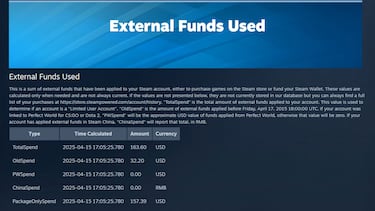
One thing to note is that there are different categories of how we find these funds. OldSpend is for everything spent before April 2015, and PWSpend is for accounts linked to Perfect World for games like Dota 2 or CS:GO. ChinaSpend is for purchases made in China. The total amount can be seen in TotalSpend.
The traditional Spring Sale ended a few weeks ago, but you do not have to wait until summer and the Steam Summer Sale from June 26th to July 10th to get your hands on the following items. The next sales scheduled for this year are the Sokoban Fest from April 21st to 28th and the Wargames Fest from April 28th to May 5th.
And don’t worry, have you already checked how much you spent? Would you like to share it in the comments?
Related stories
Follow MeriStation USA on X (formerly known as Twitter). Your video game and entertainment website for all the news, updates, and breaking news from the world of video games, movies, series, manga, and anime. Previews, reviews, interviews, trailers, gameplay, podcasts and more! Follow us now!
Complete your personal details to comment